
Would you like a quick overview?
AI summary
Key points at a glance
CREATIVATE App: User-Friendly with Certain Requirements
Stitch selection and settings use a compatible smartphone; check account requirements, compatibility and additional costs.Sewing Machine with Embroidery Function: What Does the Upgrade Offer?
The optional embroidery attachment provides a 17 × 10 cm area and requires the compatible 9125.Pros and Cons: These Factors Make the Difference
Weigh digital assistance against app dependence, the limited embroidery area and the lack of hands-on results.The 9125 alone, upgrading the 905E, or a complete package?
€499 for the machine plus €150 for the attachment equals the €649 package price; checked 9 October 2026.A sewing machine controlled via smartphone that you can later upgrade with an embroidery function: The SINGER Smart Heavy Duty 9125 offers an unconventional introduction to sewing and embroidery. The deciding factor for your purchase isn’t so much the number of stitches as whether the app controls and embroidery area suit your projects.
How this article came about: We’ve compiled manufacturer specifications and current MAKEMA offers. We do not yet have our own hands-on test of the 9125. MAKEMA sells the products featured here. Data as of October 9, 2026.
Who will benefit from the SINGER Smart Heavy Duty 9125?
The 9125 is a good option if you enjoy working with your smartphone and want to keep your options open for getting into machine embroidery. You can start by choosing the sewing machine or go straight for a package that includes an embroidery unit. For large embroidery designs and operation that relies as little as possible on the app, you should also consider other options. A demonstration or hands-on test is needed to assess the quality on your favorite fabrics.
SINGER 9125: Understanding the Technical Specifications
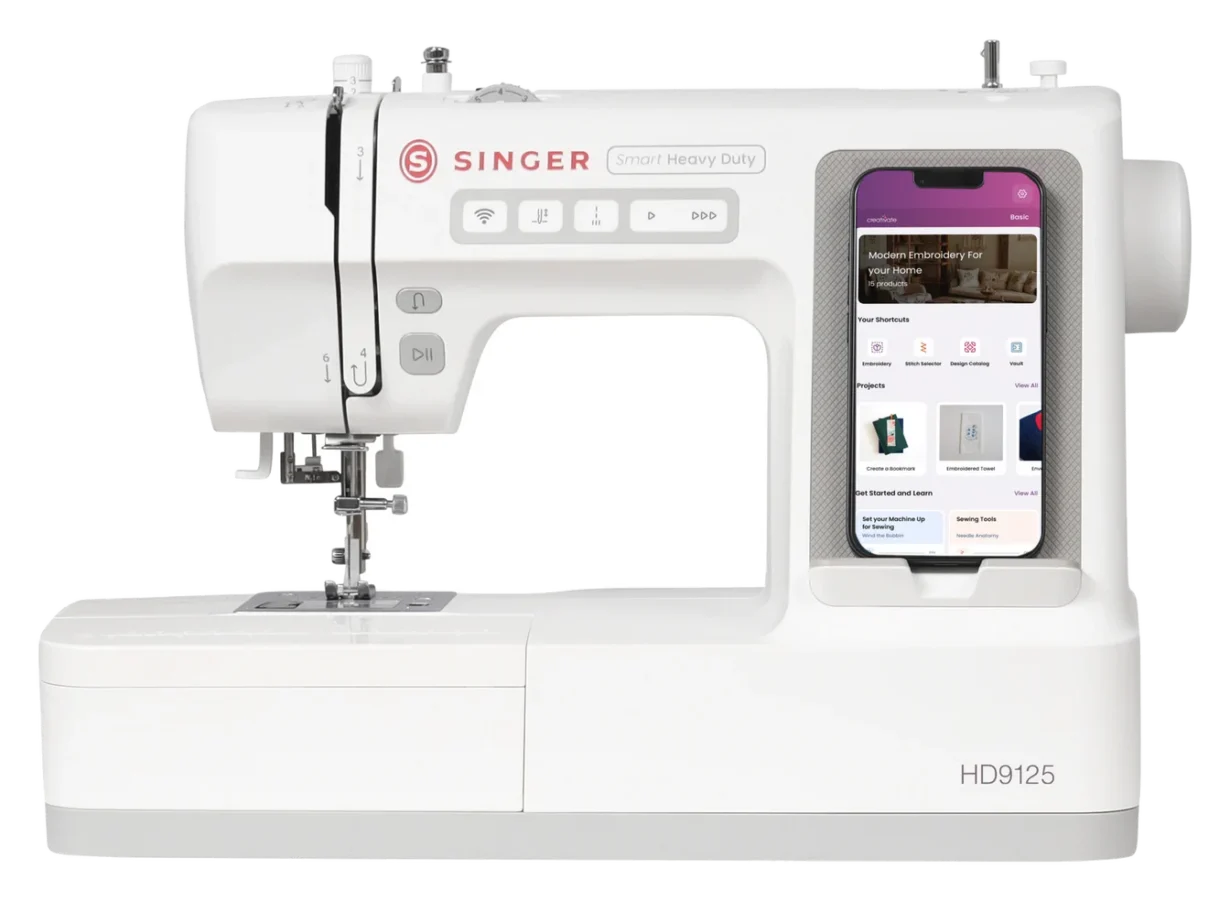
SINGER positions the Smart Heavy Duty as a computer-controlled sewing machine with app control. The European manufacturer’s specifications for the 9125 list the following features, among others. The practical classification in the last column is our editorial assessment.
| Feature | Specification | What does this mean for you? |
|---|---|---|
| Stitch Selection | 200 stitches according to MAKEMA; SINGER lists 200+ via the app | Utility, stretch, and decorative stitches; the number alone says little about stitch quality. |
| Sewing speed | Up to 900 stitches per minute | A maximum value. Controlled speed is more important when sewing curves and seam intersections. |
| Stitch width / stitch length | Up to 7 mm / up to 4.5 mm | Flexibility for decorative stitches and customized utility stitches. |
| Needle positions | Up to 29 | Helpful for aligning topstitches and edges. |
| Space to the right of the needle | 160 mm | For large quilts, make sure you can guide your project comfortably. |
| Control features | Start/Stop, speed control, needle threader, upper and lower thread monitoring | Fewer steps and fewer prompts for threading issues; proper threading remains important. |
| Construction | All-metal inner frame | Sturdy base; however, this does not guarantee compatibility with materials of any thickness. |
CREATIVATE App: User-Friendly with Certain Requirements
You select stitches and settings on a compatible iOS or Android smartphone. SINGER also provides recommendations for stitches and presser feet based on your fabric choice. This can help you find suitable default settings. It does not replace testing on a fabric scrap: fabric, thread, and needle all influence the result together. This is how SINGER explains the operating concept.

When choosing a sewing machine for beginners, it’s therefore worth asking yourself a specific question: Does the interface on your phone help you, or would you prefer to have all selection functions right on the machine? Both options can make sense. If possible, try it out with your own device to see if you can read the labels clearly and adjust the settings comfortably.
- Smartphone: It is not included with the machine. Check the app’s current system requirements and specific model compatibility.
- Account and Costs: MAKEMA offers a free CREATIVATE account for basic functions. The manufacturer’s brochure for the CREATIVATE distinguishes between free basic functions and paid memberships. Not every additional design tool is automatically included.
- Connectivity: The MAKEMA product description mentions Bluetooth and Wi-Fi. Have someone show you how to set it up and reconnect; we haven’t tested the app connection ourselves yet.
Important note for use without a smartphone: The SINGER features a built-in straight stitch and accesses the app’s extensive selection of stitches. This does not imply unrestricted operation of all functions without a phone. If you specifically want to sew without the app, clarify exactly which settings will be available before purchasing.
Sewing Machine with Embroidery Function: What Does the Upgrade Offer?
For embroidery, the 9125 requires a compatible embroidery unit. MAKEMA offers it as the SINGER Smart Heavy Duty 905E. It is an add-on for this sewing machine and not a standalone embroidery machine. It’s included in the complete package; if you purchase just the sewing machine, you’ll need to buy it separately.
| Feature | Specification |
|---|---|
| Embroidery area | 170 × 100 mm, or 17 × 10 cm |
| Maximum embroidery speed | Up to 600 stitches per minute |
| Included Designs / Fonts | 150 free embroidery designs and 11 embroidery alphabets |
| Accessories | 170 × 100 mm embroidery hoop, embroidery foot, and three embroidery needles |
Our take: 17 × 10 cm is a practical starting size for many names, smaller monograms, and individual decorative designs. For example, if your design is supposed to be 20 cm wide, it won’t fit in this embroidery area in one piece. Therefore, first select two or three specific designs you’d like to use and check their dimensions. This is more meaningful than simply asking about the maximum number of stored designs.

When getting started, also plan to purchase embroidery thread, bobbin thread, compatible needles, and suitable stabilizer. A hoop alone does not provide sufficient stability for every fabric. Our embroidery stabilizer guide will help you choose the right material for your project. If you’d like to digitize your own logos later, you should also check which software features you’ll need; motif editing and full digitization are different tasks.
Note on the model designation: The European SINGER page currently refers to the module as 900E, while MAKEMA calls it 905E. The manufacturer’s website lists the part number as 230519096. We use the designation from the current MAKEMA product listing here; however, this does not imply that differently named variants are universally interchangeable.
The Smart Heavy Duty in the manufacturer’s video
The video “Meet the new SINGER® Smart Heavy Duty” comes from the verified channel Singer Sewing Company. It showcases the concept of the product family; for purchases in Germany, the European 9125 specifications and the specific scope of delivery are decisive.
Pros and Cons: These Factors Make the Difference
Advantages of the approach
- Expand step by step: You can start with sewing and add embroidery later.
- Intuitive selection: Stitch previews and on-screen guides on your smartphone can make navigation easier.
- Control while sewing: Speed control and start/stop functions support different working styles.
- One system for both techniques: You don’t need to buy a second, full-featured machine to create the right designs.
Things to consider
- App as part of the system: Compatibility, account setup, connecting to the app, and updates are all part of using the system.
- Limited embroidery area: Large designs require a different solution or appropriate division.
- Additional costs: An embroidery unit, supplies, and, if necessary, software are extra.
- Real-world experience: We currently cannot evaluate connection stability, noise level, and material handling based on our own testing.
The 9125 alone, upgrading the 905E, or a complete package?
Always compare offers with the same scope of delivery. The following prices were verified on October 9, 2026, at MAKEMA; they include VAT, plus any applicable shipping costs. Current prices and delivery dates are listed on the linked product pages.
| Offer | Price on the date of verification | When is it a good choice? |
|---|---|---|
| 9125 Sewing Machine | €499.00 | You want to start by sewing and decide later whether to add embroidery. |
| 905E Embroidery Unit | €150.00 | You already have the compatible 9125; the module cannot be used on its own. |
| 9125 including 905E | €649.00 | You want to start sewing and embroidering right away. |
As of the date of this review, 499 € plus 150 € equals the same total as the complete package. Based on these three prices, the package does not offer a price advantage; its benefit lies in the matching set of included items. MAKEMA lists these offers as pre-orders with an estimated delivery date in November 2026. A specified date does not constitute a guaranteed delivery commitment.
Which starter kit is right for your projects?
Check out the current package contents for the SINGER 9125 with embroidery unit at MAKEMA. If you’re still undecided about the embroidery feature, compare the 9125 as a sewing machine. Our sewing machine guide will help you with your initial selection.
Frequently Asked Questions Before Purchasing
Is this article a review of the SINGER-9125?
No. It is an editorial overview of new products with buying advice. For a comprehensive review, we would need to test, among other things, stitch formation, fabric feed, thick seam intersections, app connectivity, and embroidery quality using documented projects. We do not yet have such results.
Can the 9125 sew without the embroidery module?
Yes. The embroidery unit is required for the embroidery function. Whether the sewing machine alone is sufficient for you depends on your planned projects.
Is a paid CREATIVATE subscription required?
According to MAKEMA, a free account is sufficient for the basic functions. Additional services and tools may incur a fee. Check specifically which features you want to use, rather than assuming the app name implies a full range of software capabilities.
Is the Smart Heavy Duty a sewing machine for jeans or leather?
The manufacturer highlights its piercing power and a metal inner frame. However, there’s no evidence to support a specific number of denim layers or its suitability for thick leather. Bring typical material samples with you for a purchase consultation, including your most challenging seam intersection.
Can I embroider my own logos using the embroidery option?
A logo must be available as a suitable embroidery file and fit within the available embroidery area. A JPG or PNG image is not yet a fully digitized embroidery file. Also, clarify the supported file format, the transfer method, and any required software before purchasing.
Our Conclusion: Choose Based on Your Projects and How You Plan to Use It
The SINGER Smart Heavy Duty 9125 is particularly interesting because of its expandable design. If you enjoy using digital tools and plan to work on smaller embroidery projects, it belongs on your shortlist. To help you decide, we recommend three steps: Check how your desired designs look on a 17 × 10 cm area, try out the app on your smartphone, and have the machine demonstrate how it handles your typical fabrics. Only then will you see if the spec sheet and the machine’s performance are a good fit.
If you’re mainly looking for a sewing machine that’s as straightforward as possible—without a heavy focus on the app—or if you regularly need a large embroidery area, it’s worth consulting about other machines. Our goal is for you to buy the right system and enjoy using it for years to come.
Sources and Data as of
- SINGER Europe: Smart Heavy Duty 9125, Product Specifications
- SINGER Europe: Embroidery unit, item number 230519096
- SINGER: Smart Heavy Duty Operating Concept
- VSM Germany: CREATIVATE brochure
- MAKEMA: Current complete product lineup and scope of delivery, as well as the individual product listings linked above
Reviewed on October 9, 2026. Editorial opinions are marked as such. Manufacturer images and videos do not constitute our own test results.